How to Record a Live Stream on Mac & Windows
Record ongoing live streams — YouTube Live, Twitch, and other HLS broadcasts — straight to your Mac or PC in original quality. Press stop whenever you like and the recording is saved instantly. No OBS, no screen recording, no waiting for the broadcast to end.
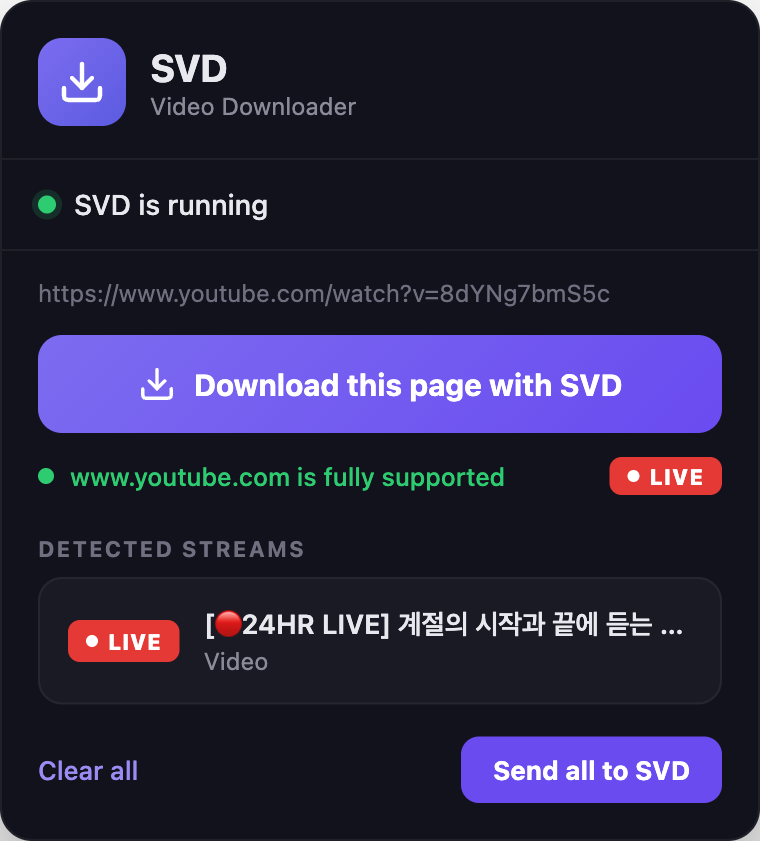
What SVD can record
- YouTube Live — ongoing live broadcasts and 24/7 live channels
- Twitch — live channels, recorded in real time
- Other HLS live streams — news channels, radio, and most sites whose live video your browser can already play
SVD does not record DRM-protected or encrypted live streams (paid sports on DRM platforms, etc.). It only captures non-DRM streams you can already watch.
Record in 4 steps
Install SVD
Grab the Mac or Windows build from the home page. Apple-notarized on macOS, and local-only.
Open the live stream
Copy the live URL — a YouTube Live watch link, a Twitch channel (twitch.tv/channelname), or any live page. Or use the SVD extension, which detects live pages and shows a LIVE badge.
Pick a quality
SVD lists the available live renditions. Choose a resolution and start — recording begins from the live edge (the current moment).
Stop to save
Press stop whenever you want. Whatever you've captured so far is finalized and saved as a playable file — you never wait for the broadcaster to end the stream.
Why "stop = save" matters
Most ways of capturing a live stream force you to babysit the whole broadcast, and if something goes wrong you lose everything. SVD is built for a manual record/stop workflow:
- Records from the live edge — capture starts now, so files stay small and predictable instead of pulling hours of backlog.
- Stop anytime — hit stop and the captured portion is saved immediately as a playable file.
- Interruption-safe — if your connection drops mid-record, the part you already captured is preserved, not thrown away.
Schedule a recording in advance
Know when a stream goes live? Schedule the recording ahead of time — SVD starts it for you at the set time, and stops and saves at an optional end time. You never have to sit and wait for the broadcast to begin.
Paste the URL, click Schedule
Enter the live stream URL and click Schedule instead of Download. You can schedule a broadcast that hasn't started yet.
Set the start time
Type a start time, or use the quick presets — +30 min, +1 hour, +2 hours.
Set an end time (optional)
Leave it blank to record until you stop manually, or set an end time and SVD auto-saves and stops then.
Ready to try it?
Free 7-day trial. No account needed. Your recordings stay on your machine.
Live recording vs screen recording
- OBS / screen recorders — re-encode whatever is on your monitor: lossy, CPU-heavy, and quality is capped at your display. SVD pulls the original HLS feed for source-quality recordings.
- Browser "download" buttons — built for finished videos, they can't handle an ongoing live feed. SVD records in real time.
- yt-dlp on the command line — powerful, but you have to know the flags and babysit the terminal. SVD is a native GUI over the same engine, with a stop button that just works.
Frequently asked questions
Can SVD record a YouTube Live stream?
Yes. Paste the YouTube Live watch URL (or use the SVD extension) and SVD records the broadcast in real time. Stop whenever you like and the recording is saved.
Does recording start from the beginning of the broadcast?
No — it starts from the live edge, the moment you press record. That keeps recordings small and matches the manual start/stop workflow. Earlier parts would require a VOD after the stream ends.
What happens when I press stop?
The captured portion is finalized and saved as a playable file right away — no waiting for the broadcaster to end the stream.
What if my internet drops while recording?
The part recorded so far is preserved rather than discarded, because SVD writes to a container that stays playable even when interrupted.
Can I schedule a live recording?
Yes. Click Schedule instead of Download, set a start time (and an optional end time), and SVD starts recording at that time and saves it. SVD must be open at the scheduled time — it's a desktop app and won't wake your computer.
Is this better than recording with OBS?
For most people, yes. OBS re-encodes your screen (lossy, CPU-heavy, monitor-quality). SVD records the original stream feed at source quality with low CPU use.
Can SVD record DRM-protected or paid live streams?
No. SVD does not break DRM. It only records non-DRM live streams your browser can already play.
Download SVD now
Free 7-day trial · No credit card · Apple-notarized (macOS) · Works offline