SmartScreen warnings? Here's how to install SVD safely.
Windows flags installers that haven't built up download reputation yet. SVD is safe — pick your browser below and follow the steps.
⚠️ Why does Windows show these warnings?
Microsoft Defender SmartScreen flags any installer that hasn't been downloaded by enough people yet. The same warning shows for many small independent apps — Obsidian and Raycast both went through it — until they build up reputation.
Since version 3.0.10, the Windows installer is code-signed, and Windows shows the publisher as byjwstudio. SmartScreen may still warn for a while, because a new signature builds reputation as more people download it. You can also verify the installer yourself with the SHA-256 hash at the bottom of this page. The macOS build is signed and notarized by Apple.
Which browser are you downloading with?
The warnings look completely different in each, so the steps are too.
⚠️ Got a 0-byte file, or one that won't open?
Then the download never finished. A complete download shows the full size in your browser's download list — this is Chrome, and Edge shows the same thing in its own download tray:
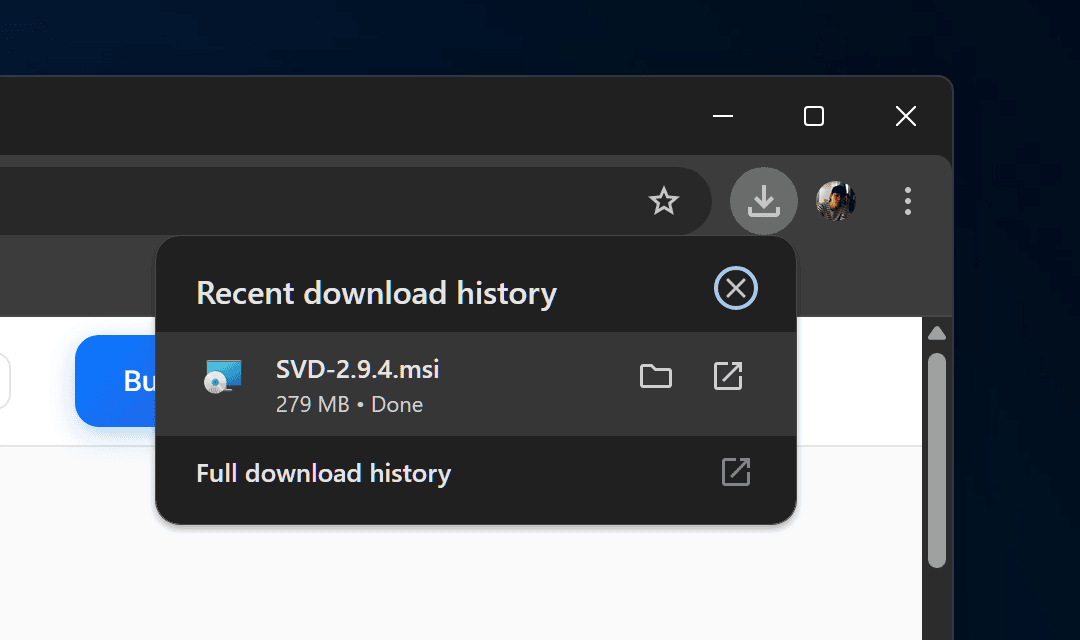
SVD-3.0.16.msi is about 280 MB. If yours is 0 bytes, much smaller, or still ends in .crdownload, it was blocked or cut off — usually by SmartScreen or antivirus, not by a broken link.
Delete the partial file and download again. If it keeps failing, pause your antivirus for the download or try another browser, then confirm the result with the hash below.
If "Keep anyway" is greyed out and hovering it shows "Managed by your organization", a Windows or Edge policy on this device is blocking the download outright. That's a device setting, not something we can fix from our end. Download with PowerShell instead:
Invoke-WebRequest -Uri "https://storage.googleapis.com/getsvd-downloads/releases/v3.0.16/SVD-3.0.16.msi" -OutFile "$HOME\Downloads\SVD-3.0.16.msi"
This skips the browser download layer entirely. Check the hash afterwards, then run the MSI as usual.
🔐 Verify the installer (optional)
To confirm the file you downloaded is the exact one we built, compare the SHA-256 hash:
certutil -hashfile SVD-3.0.16.msi SHA256
Expected hash for SVD-3.0.16.msi:
bf5dcbcb316e23f3985d7f97c34349f49d00b9984a4b1b6a25428e14737c38e1
If it matches, the file arrived complete and untampered. A mismatch — or a 0-byte file — means the download was blocked or cut short.